Murphy’s law

Imagine a giant explanation mark and a giant question mark right over my head these days, followed by a loud yell saying, “Seriously??!!??!!”

It’s nothing emotionally driven that bothers me nowadays, it’s the sodding technical devices that die like flies under my hands. First it was/is my MP3 player that decides to no longer make a data connection to my PC (or any other PC). That’s basically bad manner. I have to listen to the same songs and albums eternally because I can’t transfer new music to this damn thing. It’s just four years old and the generation of MP3 players that’s currently on the market is much of an improvement compared to the own I currently own.

Secondly, my outdoor phone, aka Motorola Defy, also decided to pass away the before. It ran with ICS alpha version for a couple of days. I found it very laggy so I switched back to CyanogenMod 7.2 RC1. Which worked fine. Totally. Until I had to a reboot. The phone hung on restart. I was able to get it into USB mode that I can install the stock ROM and set everything to default. The procedure worked totally fine as well, said “PASS” at the end without any error messages. The phone rebooted, and… NOTHING. Nothing was happening then… black screen of death, or whatever you like to call it.

This is two devices lost in one week. Well, my MP3 is still working and charging under some circumstances, but I guess, my phone is lost for good. And I just prepared it for some outdoor sports activities to get rid of some weight. Murphy’s law.

A taste of ice cream sandwich

According to the fact that there are no impressive game releases these days and I have a small amount of time left in my spare time, I was digging a little the Android scene. My main intention was to get some hands on on the latest Android – Codename “Ice Cream Sandwich” – and see how it works in my phones. The HTC Desire S and the Motorola Defy.

I tried the Virtuous Quattro RC3 and the CyanogenMod 9 Alpha builds for the HTC Desire. The Defy got stuffed with the experimental builds of CyanogenMod 9 as  well.

At first glance, for all devices, ICS looks amazing and the overall redesign looks very homogenic and a lot of obstacles in the menu structure has been ridden. When you’re used to Android and use it for quite a long time, you’ll find yourself in a re-orientation situation. But ICS is very user friendly and now, in my opinion, on the same level with Apple’s iOS.

Virtuous Quattro RC3 was one of the first ROMs I installed and my impression was, ‘Yeah, looking gooood.’ But in the end, the speed and smoothness of this ROM was terrible. And even though it was an RC it felt more like a fast pushed alpha version. It had several bugs like the clock crashing and syncs that did not sync. All in all, it looked cool, but it felt awful.

CyanogenMod 9 for the Defy was, because it was alpha, the same buggy experience, but it felt usable, except for the camera, but that’s a problem on lot of devices. I was expecting that this ROM would not work completely fine and that it would be another first look thing. Anyhow, despite the slow performance can I say, that the CM team is definitely on the right way and without a doubt, the old Defy is capable running ICS.

Last but not least, I installed the alpha build of CyanogenMod 9 on my Desire S. I tried the builds from January 27 and 30. The first one had almost the same low performance like the Quattro ROM, but the nightly build of January 30 runs almost smoothly and came pretty close to what you are used to with CyanogenMod 7.x

Only one camera is currently working on the Desire S. With the latest release I got some issue with syncing Facebook to my contact list. This ROM still’s got the issue that WiFi is not running fine with certain router/access points and various encryptions. The issue is well known in many bug reports, even for stock ROMs and I was hoping for a final fix. Bummer!

As a summarization can I say, the AOSP ICS developers have done a great job so far and I’m so dead certain that CyanogenMod 9 will be a giant hit. On the other hand, there’s still a long road to walk till it’s time to announce the first beta releases and it’s even further more away to announce a real release candidate. Lots of RCs that you can find these days for many devices are quick born, badly supported ROMs that you should only use when you like to do some bug fixing or if you’re just interested in Android Ice Cream Sandwich.

I personally switched back to CyanogenMod 7.2 on my Defy and will also switch back to Reaper (CM7 derivate) on my Desire S.

Androidify me

Reading, researching, experimenting, reading, researching and sometimes you fail and sometimes you gain success. Due to the fact that the evenings are getting colder and darker I turned to some more home oriented hobbies. Actually, ninety per cent of my hobbies happen at home, but that’s another story.

Back in the days I hated working on phones and tweak them or whatever. You system memory was ridiculously tiny and the processor was some kind of a joke. Nowadays mobile phones and especially smart phones come up with one or two cores and a clock rate beyond 1,000MHz. And additionally, we were gifted with a RAM that can take more than just 64KB.

My passion are Android phones and the Android operating system. I’ve started with a entry model, a Motorola Backflip MB300. I did a lot of counterproductive to this phone, but it survived without waving the white flag and surrendering. Right now it runs CyanogenMOD 7.1 which is based on Android 2.3.7. This makes this phone pretty bleeding edge and totally bad ass. Anyhow, this phone is slow. Patience is what you need to tweak and hack this ugly thing.

I switched to an HTC Desire S as my new main phone. It also runs CyanogenMOD 7.1. I’m not planning to run a lot of ROMs on this phone. After having struggled so much with the Backflip I want at least one phone that is highly available. My next “big thing” is a Motorola Defy. This will be the phone for my next evil experiments. I’ve found a used one really cheap on Amazon and it’ll hopefully be delivered.

If you want to ask what makes Android so interesting to me, it’s basically the way endless possibilities to customize your phone. On iOS for instance you have one store to get your software. You have only one interface that you can use. If you want to have something special or something the Appstore does not offer, you have to jailbreak your device. The iPad I once had was a jailbreaked one and it was terribly monotone anyway. Appstore alternatives were terrible and most of the apps that should modify the GUI made minor changed not worth to mention.

Windows mobile is not an option. The overall design of and the usability of the phone is decades behind the today’s state of art. As far as I’ve seen the GUI, it’s a giant step backward and far from transparent. I don’t like such things. But discussing this could lead to a discussion like “Windows vs. Linux”

Would lead to nothing and is in the end a matter of taste and user skill. Whatever the case, I’ll hopefully get the Defy pretty soon and experiment with it. I’ll keep you informed about my evil plans.

Froyo Backflip field report

Some of you might remember, I was modding my Android smartphone a while ago and I switched from Android 1.5 to Android 1.6. Actually, not a big step. Afterwards I moved to Android 2.1 including MotoBlur which doesn’t gave me a massive performance improvement as well. But I was finally able to get access to a lot more applications from the Android market. Finally, I found a modded version based on the CyanogenMod for my Motorola Backflip.

It’s an Android 2.2.1 with a lot of bugs needed to be fixed. Camera wasn’t working, which is now fixed. The keyboard wasn’t working correctly, which is nearly fixed. And some GPS issues stressed me as well. I also had the problem, that it wasn’t overclockable, so I had to use a custom kernel, too though. I’m using this particular version on my phone for like four or five weeks now and I’m almost satisfied with.

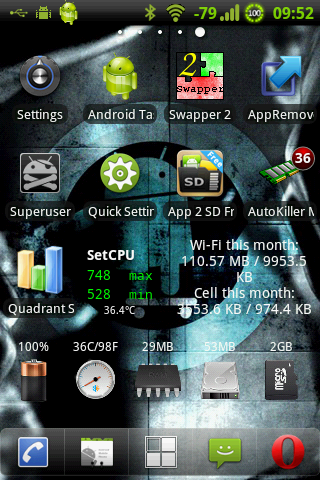
There are still performance problems which I was able to trick out a little. First of all, I’m using Autokiller Memory Optimizer which handles the whole memory management of Android a little better than it would normally do. Secondly, I’m using a swap file, created with Swapper2, to gain a little more memory space in the backhand. And last but not least, the Android Task Manager, to get a little more on running tasks.

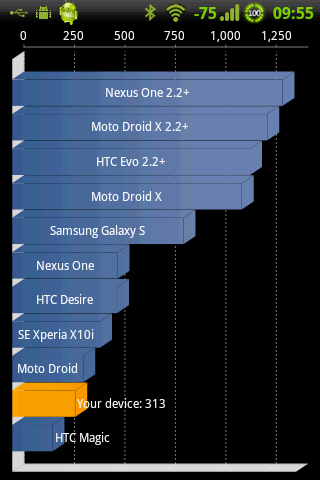
Benchmarks speak a clear language, in comparison to stock Android 1.5 with MotoBlur the new version 2.2.1 almost doubled the performance of the phone. I had like 150 to 180 points in Quadrant Standard benchmark on Android 1.5 and now I gain like 310 to 350, depending on what services are actually running and the CPU clock speed.

During this whole development and experience progress with Android I also bought a couple of applications from the market that I found very usefull though. First of all, it’s Titanium Backup that I mainly used to “deblur” my phone on Android 1.5 and Android 2.1. Sure thing that it gave the phone a blast, but it was also causing some trouble, mainly when it comes to contact management. I’m also a big fan of ADW.Launcher now, which is a fine GUI for Android and I simply thought that it was worth supporting it with a buy. Definitely an improvement. Due to the fact that I also use my phone to listen to some music here and then, I found that PowerAMP is totally awesome and gives some fine audio quality to your ears.

To get this straight, I’m not going public with my modified Android version, this is just a small project of mine to get a little bit more into Android itself. I don’t have time nor the will to release a custom firmware for Android and even support it in any way.