
Mind the gap

It’s a new bloody year and the old one, system wise, ended terribly. I wanted to use the weekend to do some changes on my media centre and I got stuck right at that point, where I wanted to put the motherboard inside the chassis.

The motherboard itself fit, but I wasn’t able to connect all the SATA plugs because there’s simply not enough room for them. One slope and the lack of holes where you actually need them refused to let me rebuild my media centre. We’re talking about an issue with the size of almost a quarter inch.

Without a doubt, replacement for the chassis was needed. To be honest, I wasn’t very satisfied with the chassis since buying it. The fan system was rubbish and too noisy. Too much plastic and not enough room inside. Which is now again to be proven as correct.

I ordered an anidées AI-6 chassis, which looks very plain and elegant. It’s a solid build with more metal elements and less plastic. I’ve also got a USB3.0 connector includes and the cable management looks even more logical. The fans aren’t to be seen at first glance. Mainly hidden but air can get in and outside through well designed vents.

Whatever the case (!), I’m looking forward to get this chassis as soon as possible to rebuild my media centre. I also go by and do a complete new setup of the Windows system, which hopefully will not waste too much time.
Barely finished… but almost

Normally, when I work on a PC and build it from the ground up, it takes like two hours to nearly half a day. Since I’ve started with rebuilding, cleaning, repairing and upgrading my gaming rig, six days have passed. The intention actually is to make it as good as possible. I don’t want no hidden rubbish areas in my chassis and most importantly no dust. Old builds of my PC always included weird cable constellations and packed cable  trees in narrow corner. I tried to avoid things like this in this very build.

It takes a lot – and I mean a looot of time – to get all things arranged as one can possibly can. The mainboard alone was put around 6 – 8 times in the chassis. Main problem with the board was the backplate that was using too much space and could cause short-circuits. I finally found a good solution using less space and definitely not responsible for eventually upcoming short-circuits.

Another point is, well, it’s this kind of fetish of mine. I always use to put as much components in my PCs as possible. My working rig is somehow different, but mostly every PC I own is always packed. And by saying packed, I mean packed.

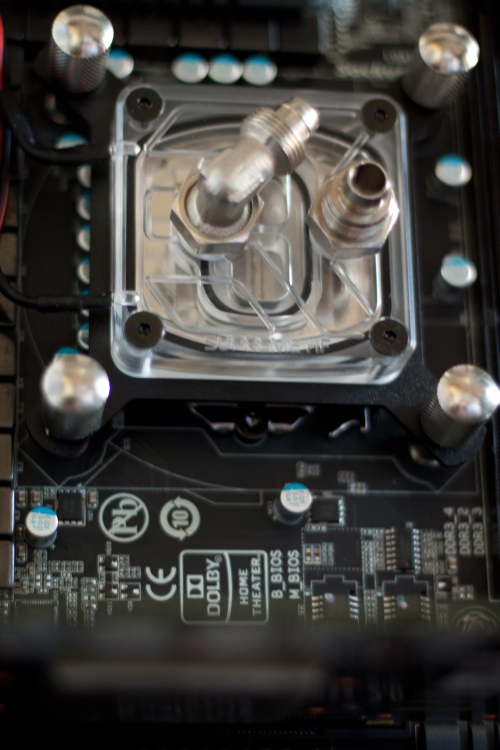
As you may know, the PC uses water cooling. Until now you can only find a water block on the CPU and a couple of tubes wandering through the chassis. The water pump is already installed, too. This time I decided to put the pump a little differently inside to gain a little bit more space inside. Additionally did I put some foam around the pump to minimize vibrations going on to the frame of the chassis causing noises. I also have plenty of room to do some quick maintenances in the case of an incident.

My new graphics card is going to be delivered this day’s afternoon and I’ll probably go to finish this PC by today’s evening. I was very lucky to get a 64GB SSD pretty cheap that I’m able to use ISRT immediately. I hope that it’s going to work with an previously set up RAID0, the storage solution that I always use for my system- and games partitions.

Anyhow, I’m pretty excited and nervous today and hopefully everything is getting well. I haven’t been working on a PC for such a long time before I finally started it and hopefully it’s going to be a good harbringer.