
A prig with the rig

In a rush and packed with a lot of experience from the previous installation I went on by the day before and re-installed my new gaming rig. It’s now a setup I actually like and what fits my quality standards. I hate PCs that include a driver farm or orphans from previous and malfunctioning drivers, like I had on the setup before. What I did before was to install everything automated from the DVD that came with the motherboard and a lot of drivers and software has been beta. Updating and upgrading was a real pain in the ass. After this whole procedure I had more failures than before.

Whatsoever, this first installment was for testing purposes only and it wasn’t intended to be for eternity. I’m now having the system with all the drivers I actually needed. The version numbers I wanted. And the hardware tools are functional. The only bug I actually had, was to be found in the Windows Game Explorer. I have to add, that I use the Vista Game Explorer Editor to get all my games correctly listed in the Windows Game Explorer. First games that I install, besides Steam, is the Blizzard bundle, like StarCraft, WarCraft, Diablo etc.

After installing these games I opened the WGE to scan for new games. The only game that got updated was StarCraft, WarCraft and Diablo II was abandoned with an ugly icon. I then tried to use the VGEE, it found StarCraft and was set up correctly. I restarted VGEE and when I tried to edit some more games I was welcomed by an error message and all the previously added games were deleted from list.

I’ll make it short, the only way to fix this very issue was to uninstall them. Check out the WGE for errors. Additionally did I go to the registry entry of the WGE and assured that there is nothing left from previous game installations. I also deleted the link files that were left in my user profile. I then re-installed the games that were causing these errors. I opened the WGE to let him scan for new games. After that I went to the registry entries of WGE and deleted the entries that were added for the new games. I also found one empty entry that was removed, too. Link files in the WGE section created in my user profile were deleted again. Et voilá, I was able to open VGEE and getting update information on games without errors our devastating my WGE list.

I’m pretty sure that there are more games out there causing errors like these and most likely they will be caused due to this empty entry key in the registry. It sure will be a good decision to backup WGE’s registry keys AND soft links before actually editing the WGE with VGEE. I first found this issue after having installed around 60 games and this made me more than just angry.

Time to start it over

It’s pretty much a week now that my new gaming rig is up and running and my first summarization is: “I’m happy and satisfied”

The performance increase is so massive it’s such a pleasure to work with this system. I’ve done several benchmarks and lots and lots of stability tests and the final setup is far beyond my expectations. I didn’t wanted to have ultra hardcore settings these times for one simple reason. I did not want to burn my rig as fast as possible. I was more in a mood to find a good 24/7 setup. A balance between performance and green IT. Something between strong overclocking and energy saving. I finally found the settings I needed.

Additionally did I also change the heat exchanger in my water cooling circuit to get a much better results in cooling. The old dual fan heat exchanger was far beyond its capacity and the water was pretty much near the boiling point. After stressing my system for a couple of hours the CPU was finally at 72°C and the graphics card was something around 50°C. I ran Prime95 and Unigine Heaven Benchmark at the same time for over two hours. The outside temperature was around 25.5°C on these stressing days. I still don’t understand how people can get cooling results of 35°C with air cooling on their CPUs like you always find them in forums and review pages on several discounter sites.

Anyhow, the system is finished now and everything is totally up and running, but I’ll start things over. It’s like an old tradition that I never stay on a system for month that needed, let us say, a little exploration time. I’ve exchanged lots of software versions and drivers during the setup and I’m not a big fan of having orphans on my system. Additionally, the game explorer is not working a 100 per cent and this is because of one irreversible mistake I’ve done during setting this rig up. It’s going to take me like another 20-30 hours of work time, but it will be worth it.

It works!

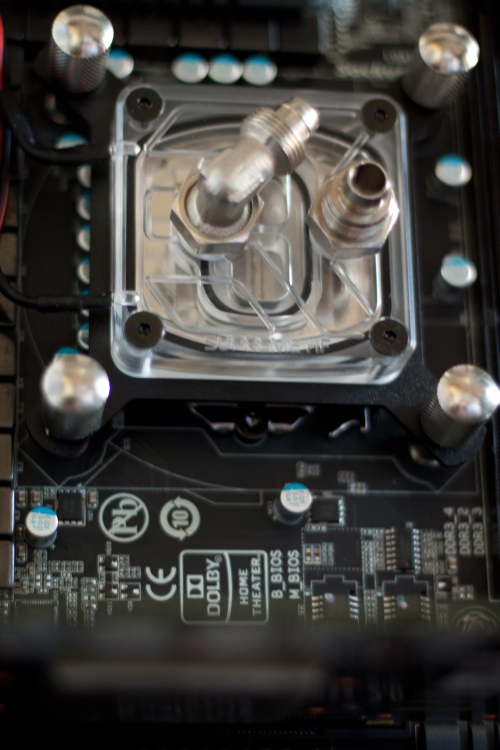
I’m so happy. I’m sooo happy. After days of working on my new PC yesterday was the day where it was time to turn it on and see if it actually works. And it worked and still works. I mentioned previously that I had some serious problems with the water block that might additionally have caused a short-circuit on the system, but I was able to solve it.

I was expecting a children’s disease here and there while setting up the whole system, but it wasn’t the huge hurdle I was expecting. I had some tiny problems with the RAM. With completely full stacked RAM slots and without X.M.P. enabled the motherboard simply wouldn’t start and was caught in a boot loop. There was one system freeze on the very first installment of Windows 7, which could finally be solved by updating to a newer BIOS version. ISRT is not working at the moment. When I go by and enable RAID XHD the system denies to boot. It is not even able to boot a Windows 7 DVD or anything else. I’m pretty sure that this is just a BIOS related issue that is going to be fixed by Gigabyte within the next couple of weeks.

As you may know, I’m a benchmark addict and I just couldn’t hold to do a little 3D Mark 11 from the scratch. I gained around 6,600 points without any tweaks and tuning, which is around 700 points more than I my old system. Man, I’m so excited to finally overclock the CPU and even the graphics card. Till now the whole system is pretty basic. I spent a lot of time in doing some quick researches on drivers and utilities used on this board. ISRT was the only one that actually needed an update to give a software response. Anyhow, it’s not working in hardware so I decided to use this drive for ReadyBoost at the moment.

For the time being I’m going to restore my Steam library and install the most common program to get me back to track. I guess after get a little bit more into the whole infrastructure of the board and learning about its little bugs I’ll do a couple of benchmarks.

Barely finished… but almost

Normally, when I work on a PC and build it from the ground up, it takes like two hours to nearly half a day. Since I’ve started with rebuilding, cleaning, repairing and upgrading my gaming rig, six days have passed. The intention actually is to make it as good as possible. I don’t want no hidden rubbish areas in my chassis and most importantly no dust. Old builds of my PC always included weird cable constellations and packed cable  trees in narrow corner. I tried to avoid things like this in this very build.

It takes a lot – and I mean a looot of time – to get all things arranged as one can possibly can. The mainboard alone was put around 6 – 8 times in the chassis. Main problem with the board was the backplate that was using too much space and could cause short-circuits. I finally found a good solution using less space and definitely not responsible for eventually upcoming short-circuits.

Another point is, well, it’s this kind of fetish of mine. I always use to put as much components in my PCs as possible. My working rig is somehow different, but mostly every PC I own is always packed. And by saying packed, I mean packed.

As you may know, the PC uses water cooling. Until now you can only find a water block on the CPU and a couple of tubes wandering through the chassis. The water pump is already installed, too. This time I decided to put the pump a little differently inside to gain a little bit more space inside. Additionally did I put some foam around the pump to minimize vibrations going on to the frame of the chassis causing noises. I also have plenty of room to do some quick maintenances in the case of an incident.

My new graphics card is going to be delivered this day’s afternoon and I’ll probably go to finish this PC by today’s evening. I was very lucky to get a 64GB SSD pretty cheap that I’m able to use ISRT immediately. I hope that it’s going to work with an previously set up RAID0, the storage solution that I always use for my system- and games partitions.

Anyhow, I’m pretty excited and nervous today and hopefully everything is getting well. I haven’t been working on a PC for such a long time before I finally started it and hopefully it’s going to be a good harbringer.

It’s dead and will not move no more

After having pushed several of my graphics cards to their limits and beyond I have to announce a death in the family. My Geforce GTX 570 died after some burn-in tests with FurMark. I was able to run 3DMark 11 a couple of times, but the card finally suffered the big heat and decided to simply turn off. Actually, one voltage transformer decided to burn out and the card wasn’t functional anymore. This happened because of several reasons. First of all, I think that the core voltage wasn’t set to high, because 1.152V is actually a value a GTX 570 should be able to handle.

I personally think that the overall heat, even in the water circle, was a to high. Around 50°C of pure water warmth is something that brings every circular flow assisted system on its knees. Anyhow, the whole system was boiling and cooking and my graphics card said “No, I’m leaving here”

Like I said before, I know that the GTX 570 is capable of handling the previously mentioned core voltage. I guess the used components were like manufactured on a Monday and deserved to die. After giving condolences and mumbling some last words to her, I decided it’s time to switch to something really, really fucking bad and ordered a Geforce GTX 580. Firstly, I ordered the wrong one. A Good Edition by Gainward with the main problem that the PCB differs from the original one. That’s a giant problem for me, because I use a waterblock that is designed for the common Fermi 570/580 design. The card is going back to sender and I finally ordered a card by EVGA.

I decided to take the Superclocked model, which is for what I believe, the card with the better single components on it. I had to pay a higher price, but that’s okay. EVGA offers some great terms of warranty and is in my opinion the new high end manufacturer. I was a fan of XFX for a long time, but they do not build Nvidia cards anymore, which is sad, because they put out some absolutely great products. I also liked Gainward a lot, but the price for their cards compared to the service afterwards is nothing in comparison to EVGA. You could say, EVGA is the real shit for every Nvidia fanboy.

At this very moment, my gaming rig is finished like 70 per cent and hopefully up and running within the next two days. I also hope that it will work, because I had some serious space issues with the retention module for the waterblock. Screws and kind of things like that touch the backplate. This IS serious, man. All fingers crossed for my work on electric isolation.

Ah, push it! Push it real good…!

Like I said in my previous blog entry, I’m going to upgrade my gaming rig. As a show of gratitude for my old system I just had to push the last bit of power out of it. I’m currently using two graphics cards in this system that are also going to be in the new system. It’s mainly a replacement of motherboard, RAM and CPU. Graphics card #1 is a Geforce GTX 570 by Point of View and it’s a charged model, which means it’s already overclocked by factory defaults. Stock clocks are 810MHz for the core and 1980MHz for the memory.

Graphics card #2 is a Geforce 9800 GT Green Edition by XFX, which is pretty common without any overclocks. Anyhow, the fan design looks pretty nice on this card. Stock clocks are 550MHz for the core and 700MHz for the memory.

I was able to push the Geforce GTX 570 up to a 880MHz core clock which is pretty good, if you consider that the stock core is actually 725MHz on a completely non-overclocked graphics card. The Geforce 9800 GT received no more than a fifty MHz overclock to the core and no overclock to the memory. So far so good, but I wasn’t very happy with these results and I also wasn’t very satisfied with the fact that all these overclocks happened in software only by using the MSI Afterburner.

After some research I finally found a version of NiBiTor that was able to actually handle my BIOS files that I read out with GPU-Z. The Geforce 9800 GT was pretty to modify. I was able to set the core-, shader- and memory-clock on the “main-page” of the program and I slightly adjusted the core voltage to 1.05V to get a little “insurance” on the core.

My Red Led Fan

The Geforce GTX 570 was a little bit more difficult, because I wasn’t just able to adjust the clocks on the main page. NiBiTor offers a sub-menu especially for Fermi CPUs and the bunch of numbers I first saw was way confusing. After a couple of minutes of asking Google I finally found a good website explaining how to adjust the clock speeds correctly and I was ready to let the editing begin. I also had to adjust the minimum and maximum voltage on the core for two simple reasons. #1 – I wanted to get a little bit more coolness in idle mode so I decided to undervolt my card a tiny little bit from 0.92V to something around 0.85V without any stability issues. #2 – I wanted to increase the maximum headroom by increasing the voltage in 3D performance mode. The defaults were around 1.062V and I decided to bring it up to 1.151V and the maximum allowed voltage was set to a value beyond 1.2V which I probably never going to use. Damage risk, you know?

I knew what my cards were able to do in the past and I did not have to experiment that much to find the stable clock values. So the final results on my cards have been the following. The Geforce 9800 GT now runs with a clock core of 725MHz and a memory clock of 900MHz. I did not wanted to push the memory to far because it simply wouldn’t make any sense. You always have to consider that this card is used for PhysX only.

The Geforce GTX 570 got a real blast. The core now runs stable on 950MHz and the memory was pushed slightly to 2150MHz. That’s an increase of 31% compared to the stock clocks given by Nvidia. 3D Mark 2011 increased by 400-500 points. The average score on factory default clocks was around 5,300-5,400 and after overclock around 5,900 points. Unfortunately wasn’t I able to kick it beyond the 6,000 point mark. I’m pretty sure I can push the final score on the new system to something between 7,000 and 7,500 points. I’ll keep you informed.

n3gative gaming rig mark II

After two years and barely a half, it’s time for something new. I’m speaking of the CPU working in my game system. It’s a good old Intel Q9550 overclocked at 3.8GHz. Actually I don’t really want to replace him, because it’s a totally fine CPU, but over the years came the issues. First of all, I had some serious problems with the RAM. I wasn’t able to clock any higher than 1000MHz without running into crashes and freezes. But this is more a board related things.

As the time passes by came a heat problem additionally. I found the optimum settings pretty fast for the CPU and it rarely got any warmer than 60°C at full speed with all cores maximum loaded. It now hits the 85°C mark pretty fast, mainly in games like “DiRT 3” or “Battlefield Bad Company 2”. It’s a unacceptable temperature for a water cooled system. Besides this issue the CPU turns out to be more unstable as it was before. I get a lot of freezes and crashes in several applications. This could have been something RAM related but it’s not.


To make a long story short. I decided to switch to the latest Sandy bridge chipset Z68 in combination with a strong Intel i7-2600K. I was looking for a 1366 board and CPU first, but it turned out to be too expensive. I mean, I want a powerful gaming rig with a little extra tuning and not a hi end rendering engine or whatever you might name. The Intel i7-2600K seems to be the right CPU, with enough horse powers at a very fair price. It’s getting bedded on a Gigabyte GA-Z68X-UD4-B3 and hopefully isn’t the BIOS too buggy.

As far as my experience goes, the first BIOS versions of a brand new board generation are almost crap and can be considered as beta. Even a manufacturer like Gigabyte puts out a lot of bug filled and barely finished products these days, but the technical specifications of this board look very promising. I’m very optimistic that we’re going to be good friends. Anyhow, I’m gonna miss my DFI board, it was kinda killer and stable as hell.

RAM – it’s going to be 16GB of it and for the very first time ever I’m going to put Corsair RAM into my rig. I decided to pick the Vengeance series which looks pretty awesome and they will fit perfectly well with the black colour of the board. Hopefully, everything’s getting here during this week so that I can “go live” as soon as possible.

Game of the week #9/2011 – Beat Hazard

It’s been a while since writing the last “Game of the week” report and the reason for this is simple. I was playing lots of AAA titles during the last weeks and I just don’t wanted to give reviews on games thousands of websites also report about. So, this week I’ll introduce you to a title that uses the classic gameplay schema of the good old “Asteroids” combined with a little touch of modern music games. Well, actually, it is an “Asteroids” game but it differs from its predecessor. The name of the game is “Beat Hazard” and its ingeniousness comes from a very simple component, the level design, or better said, the way how you experience the level depends on the music you chose.

It’s pretty similar to a game like “Audiosurf”, you chose the music. The game calculates the level design depending on your currently chosen title. If you chose a quiet song the level is going to be a relaxed one. If you chose a thrash metal song or some techno music with a fast beat the whole things turns out a little bit more hectic. A pretty cool feature is that the fire rate of your space ship you’re controlling also depends on the current mood of the song. So if you enter a boss battle for example and the music is getting slower your fire rate will be low, too.

[youtube]http://www.youtube.com/watch?v=ob8b3hSswu4[/youtube]

In this case the game also gets a little tactical and claims some planning. The easiest way to survive things like this are mainly kiting, but in the matter of a boss battle you can only try to “hide” as good as you can. It was also curious to see that pretty normal songs like Top 40 stuff turns out to be much harder than the fast and brutal metal songs I’ve tried. Classical music is an absolute no-no because you’ll die of boredom by playing with this kind of music. Everything up tempo is fine but as soon as the beat rate drops the game also gets some kind of lame.

“Beat Hazard” is a blast to your eyes. I can’t remember any game being that full of colours and flashes and explosions and things appearing on the screen. It’s weird during the first ten to fifteen minutes, but if you’ve managed to finally get into it and if you’re not suffering of epilepsy you sure can handle this game. I always find it a good thing when you are able to put something of your own into a game and “playing” your own music is definitely a lot of fun.

Links: Official website

Wanted! Companion

Once again, it was 4:00am, the alarm clock was ringing and I kept there lying. There’s no other way than going to gym right after work this week. Actually, I don’t feel that much like losing time of the day and I’m not that tired. The big disadvantage of going to gym in the afternoons is very simple, the building is packed. I’m used to switch freely between different machines and no one’s there occupying. This makes my training in the morning more individualized and I simply don’t have to care about others. Whatsoever, going to gym, even if it’s packed, is way better than just staying at home and doing nothing. The schedule for this week says, training on Tuesday, Wednesday and Thursday afternoon and the fourth day comes up randomly this week.

I’ve recently (2 days ago) finished the single player campaign of “Portal 2” and switched to “DeathSpank: Thongs of Virtue” till I’ve found a mate for the coop campaign. If you’re also looking for someone to play “Portal 2” coop mode with you, feel free to add me on Steam (n3G.!nV4d3r). I’m also looking for someone who wants to play “Lara Croft and the Guardian of Light” with me. Actually, there are so many games that need a companion, so hook up and join.

Lowered expectations… or the lack of time

It’s a cross. I overslept like three times this week. Firstly, I missed gym two times in a row. Ya, I know that four o’clock in the morning is a terrible time to get off for some training. Anyhow, I feel good with and I’ll stay with it (if I can make it out of bed). Whatsoever, I also missed my regular alarm clock for work today. It rang, I noticed it and fell asleep again. Luckily the loss of time wasn’t that huge so I can get back home pretty early.

I took a training session the day before and, well, my overall condition was not that bad. Okay, okay, I just missed one week but I was actually expecting the worst. Maybe I’ll be able to throw some loops this weekend and get a little boost on my stamina.

The Sony network is back online and Sony’s offering lots of free stuff and compensations and all kinds of shit. I’ve got another 45 days left to play the “DC Universe Online” and hopefully Sony will come up with a lowered subscription fee as well. I was totally fine with 24 Euros for three month but unfortunately did I have some issues with one of my credit cards and they put me back on normal rate. Life’s tough sometimes, you know?